Data agents · Analysis
Building an AI agent with Snowflake, step by step
Building an AI agent with Snowflake starts with governed data, focused tools, least-privilege roles, and tests for routing and answer failures.
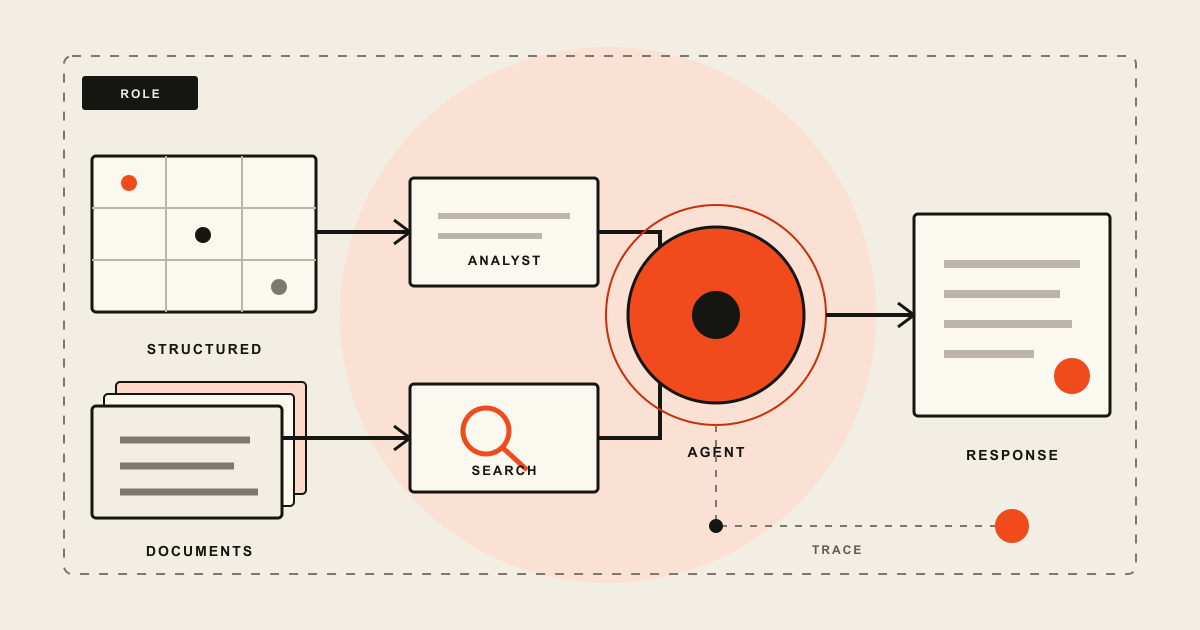
Building an AI agent with Snowflake means creating a Cortex Agent object, attaching narrowly scoped tools, and calling it through Snowflake's REST API or SQL. Use Cortex Analyst with a semantic view for structured data and Cortex Search for documents. The querying user's default role controls access to the agent and its tool resources. Test tool choice, tool inputs, answers, denied requests, latency, and cost before production use.
Building an AI agent with Snowflake is mostly a data and permission design job. The agent object is the visible part, but its answers depend on the semantic view behind Cortex Analyst, the documents indexed by Cortex Search, and the role used for each request.
Snowflake manages the orchestration loop. A Cortex Agent can plan a request, choose tools, inspect their results, and respond without a separate agent runtime. That removes infrastructure, but it does not remove application work. You still need to define what questions the agent should answer, limit what its tools can reach, and decide how your application handles a weak answer or a failed tool call.
This guide uses a support-insights example. The agent can answer numerical questions from ticket tables and retrieve policy text from support documents. It does not send messages, update tickets, or take other write actions. Starting read-only makes the first deployment easier to evaluate and safer to expose to real users.
Decide whether Cortex Agents fit the workload
Cortex Agents fits a specific shape of application: the useful evidence already lives in Snowflake, a request may need more than one data tool, and existing Snowflake governance should control access. A common example combines a structured question such as "Which product produced the most escalations last month?" with an unstructured follow-up such as "What does the escalation policy require us to do next?"
The two questions need different tools. Cortex Analyst generates SQL against a semantic view for the first. Cortex Search retrieves passages from indexed documents for the second. The agent can route across both and assemble one response.
Do not start with an agent merely because a chat box is part of the interface. A fixed report or known SQL query is easier to test and usually cheaper. Plain retrieval is enough when every question should search the same document collection. A custom runtime may be a better fit when most tools and state live outside Snowflake or when the workflow needs application-specific recovery logic.
There is also a useful boundary between the model and the runtime. The model proposes a plan and tool calls. Snowflake executes those calls under platform controls. That division matches the broader AI agent stack, where tool permissions and execution policy matter as much as model quality.
Before creating anything, write a one-page question contract:
- Name the users and the decisions they are trying to make.
- List questions the agent should answer and requests it must refuse or redirect.
- Identify the source of truth for each question type.
- Define freshness requirements, acceptable latency, and a maximum cost per useful session.
- Decide whether the response needs citations, generated SQL, charts, or a human approval step.
This contract turns tool configuration into a reviewable design. It also becomes the seed for an evaluation dataset later.
Design the smallest useful architecture
A production path has five working parts:
| Part | Responsibility | Failure to watch |
|---|---|---|
| Semantic view | Gives Analyst business terms, relationships, dimensions, and metrics | Correct SQL over the wrong business definition |
| Cortex Search service | Retrieves relevant text and metadata from documents | Stale passages or filters that are too broad |
| Agent object | Stores tools, instructions, model choice, and run budgets | Vague routing or an unnecessarily large tool set |
| Calling application | Authenticates users, sends requests, renders responses, and handles errors | Treating generated text as a guaranteed fact |
| Monitoring and evaluations | Records traces and measures behavior across known cases | Looking only at final-answer fluency |
The agent object is a schema-level object. Snowflake recommends automatic model selection for many deployments, although model availability varies by region. Tools can include Analyst, Search, data-to-chart, isolated Python execution, stored procedures or UDFs, agent skills, MCP connectors, and web search. A first release rarely needs all of them.
Start with one structured tool and one document tool only if the question contract needs both. Give each a specific name and description. "Search" tells the orchestrator little. "SupportPolicySearch" with a description that names the indexed content and expected use gives it a better routing clue.
Avoid attaching write-capable custom tools during the same phase. Reading and acting create different failure costs. If the agent eventually needs to update a case or notify a customer, add that capability behind narrow input validation and an approval path. The agent identity and attestation guide explains why the software actor, delegated user, authorization grant, and audit event should remain distinguishable.
Prepare governed data tools before the agent
An agent cannot repair an ambiguous metric layer. Define the structured source first. A Snowflake semantic view should expose the facts, dimensions, joins, and measures that match the question contract. Use business names that a user and the model can understand. Describe time grains and units. If "resolution time" excludes waiting on a customer, state that rule in the model rather than expecting the agent to infer it.
Test the semantic view with representative Analyst questions before connecting it to an agent. Review the generated SQL and compare returned values with trusted queries. Include awkward cases: incomplete periods, null categories, late-arriving data, and a user asking for a metric the view does not define.
For documents, create a Cortex Search service over a clean text column. Preserve metadata that the agent may need for filters or citations, such as document type, region, effective date, and source ID. In the agent resource configuration, describe searchable and filterable columns with sample values. Snowflake's current management documentation says those descriptions improve result quality.
Freshness needs an owner. If a policy changes on Monday but the search index refreshes weekly, a polished response can still be wrong. Record the refresh schedule, make the effective date retrievable, and test how the agent handles superseded documents. Remove duplicate or obsolete passages instead of hoping ranking will always choose the current one.
Keep the two evidence paths separate in your test plan:
- Analyst tests verify metric definitions, SQL generation, joins, and role-based visibility.
- Search tests verify retrieval, filters, document freshness, and citation identity.
- Combined tests verify that the agent uses both when a question genuinely requires both.
Create the agent object with a focused specification
You can create an agent in Snowsight, with the REST API, or with SQL. SQL is useful for a reviewable configuration that can move through normal change control. The current CREATE AGENT syntax accepts a YAML specification inside FROM SPECIFICATION.
This example shows the shape of a read-only support agent. Replace the database objects with resources that already exist in your account:
CREATE OR REPLACE AGENT support.agent_app.support_insights
  COMMENT = 'Answers support metrics and policy questions'
  PROFILE = '{"display_name": "Support Insights", "color": "orange"}'
  FROM SPECIFICATION
  $$
  orchestration:
    budget:
      seconds: 30
      tokens: 12000

  instructions:
    response: "Answer concisely. Name the source and state when evidence is incomplete."
    orchestration: "Use TicketAnalyst for support metrics. Use SupportPolicySearch for policy text. Use both only when the request needs both kinds of evidence."
    sample_questions:
      - question: "Which product had the most escalations last month?"
      - question: "What does the current escalation policy require?"

  tools:
    - tool_spec:
        type: "cortex_analyst_text_to_sql"
        name: "TicketAnalyst"
        description: "Queries approved support metrics from the support semantic view"
    - tool_spec:
        type: "cortex_search"
        name: "SupportPolicySearch"
        description: "Finds current support policies and operating procedures"

  tool_resources:
    TicketAnalyst:
      semantic_view: "support.analytics.support_semantic_view"
    SupportPolicySearch:
      name: "support.knowledge.policy_search"
      max_results: "5"
      title_column: "TITLE"
      id_column: "DOCUMENT_ID"
      columns_and_descriptions:
        TEXT:
          description: "Policy or procedure body text"
          type: "string"
          searchable: true
          filterable: false
        REGION:
          description: "Policy region, such as US or EU"
          type: "string"
          searchable: false
          filterable: true
  $$;
The token and time values are request limits, not monthly spending controls. If either limit is reached first, the run ends. Pick limits from observed task behavior, then tighten them. A large token allowance can hide looping or poor tool selection during development.
Instructions should describe observable behavior. "Be accurate" does not tell the orchestrator what to do. "Use TicketAnalyst for approved metrics, do not calculate from retrieved prose, and state when the view lacks a requested measure" gives it a routing rule that a test can check.
Configuration changes need care. Snowflake warns that setting a new specification on an existing agent replaces the existing specification completely. Omitting a tool or instruction removes it. Review the full resulting specification rather than treating an update as a partial patch.
Set permissions deliberately
Snowflake's Cortex Agents access-control documentation makes one detail especially important: the querying user's default role determines session permissions. A secondary role selected elsewhere in the application does not silently become the execution identity for the call.
The narrow database role for agent access is SNOWFLAKE.CORTEX_AGENT_USER. SNOWFLAKE.CORTEX_USER grants access to all covered AI features and is granted to PUBLIC by default in the documented setup. Organizations that need tighter access should review that default before deployment.
A minimal role setup looks like this:
USE ROLE ACCOUNTADMIN;

CREATE ROLE support_agent_user;
GRANT DATABASE ROLE SNOWFLAKE.CORTEX_AGENT_USER
  TO ROLE support_agent_user;

GRANT USAGE ON DATABASE support TO ROLE support_agent_user;
GRANT USAGE ON SCHEMA support.agent_app TO ROLE support_agent_user;
GRANT USAGE ON AGENT support.agent_app.support_insights
  TO ROLE support_agent_user;
That is only the agent layer. The role also needs access to each configured resource. Grant access to the semantic view and its permitted data, the Cortex Search service and its database and schema, plus any warehouse required by a tool. A custom UDF or stored procedure needs USAGE. Stored procedures retain their declared owner-rights or caller-rights behavior, so review that choice before treating a procedure as a safe tool.
Use separate roles for builders, callers, and monitors. Creating an agent needs CREATE AGENT on the schema. Updating it needs MODIFY. Calling it needs USAGE. Reading its threads, logs, and traces needs MONITOR. This split keeps an application role from quietly becoming an administration role.
Monitoring data can contain conversation text and full tool inputs and outputs. Snowflake stores Cortex Agent traces in SNOWFLAKE.LOCAL.AI_OBSERVABILITY_EVENTS. Access to unredacted raw fields requires the account-level READ UNREDACTED AI OBSERVABILITY EVENTS TABLE privilege in the documented monitoring path. Treat that privilege as sensitive access, not a routine analyst grant.
For REST authentication, Snowflake supports programmatic access tokens, key-pair JWT authentication, and OAuth. Choose the method that matches the application's identity lifecycle. Do not embed a personal token in source code or reuse one broad Snowflake user across unrelated customer contexts.
Call the agent from an application
For most application integrations, Snowflake recommends the REST API. An existing object runs at this endpoint:
POST /api/v2/databases/{database}/schemas/{schema}/agents/{name}:run
The API streams server-sent events by default. A simple server-side integration can request one JSON response with "stream": false:
curl -X POST \
  "$SNOWFLAKE_ACCOUNT_BASE_URL/api/v2/databases/support/schemas/agent_app/agents/support_insights:run" \
  --header "Authorization: Bearer $SNOWFLAKE_PAT" \
  --header "Content-Type: application/json" \
  --header "Accept: application/json" \
  --data '{
    "messages": [
      {
        "role": "user",
        "content": [
          {
            "type": "text",
            "text": "Which product had the most escalations last month, and what does the policy require next?"
          }
        ]
      }
    ],
    "stream": false,
    "tool_choice": {
      "type": "auto",
      "name": ["TicketAnalyst", "SupportPolicySearch"]
    }
  }'
The example path uses support as the database and agent_app as the schema. Preserve URL encoding when names contain characters that need it. In production, build the payload with a JSON library rather than string concatenation.
Streaming clients should parse typed SSE events and tolerate unknown event types, as Snowflake's API documentation advises. The final response event contains the aggregated output. Its metadata includes token usage and run identifiers, which are useful for cost attribution and support investigations.
Threads preserve conversation context. If a request uses thread_id, it must also provide parent_message_id; the first message uses parent ID 0. On follow-up turns, use the prior assistant message ID returned in response metadata. Do not confuse thread persistence with durable business memory. A thread is conversation context, while customer facts and decisions still belong in governed systems of record.
The REST API has a 15-minute timeout. Design the calling application to handle timeout, authorization failure, tool warnings, partial output, and a completed response that still fails a business rule. Snowflake also exposes DATA_AGENT_RUN for non-streaming SQL calls, but recommends REST for most uses.
Test routing, evidence, and failure behavior
Testing only the final wording misses the failure that matters. A plausible answer may come from the wrong tool, use a bad filter, or combine periods that should remain separate.
Build an evaluation set from the question contract. Include ordinary questions, ambiguous wording, unsupported requests, permission boundaries, stale-document traps, and prompts that try to override tool instructions. For each case, record the expected answer where one is stable and the expected tool calls where routing matters.
Snowflake's Cortex Agent evaluations support answer correctness and logical consistency. Tool selection accuracy and tool execution accuracy are Public Preview features on the publication date of this article. Custom metrics can grade a domain rule through an LLM judge, but an LLM score should not replace deterministic checks for numeric equality, required citations, or forbidden actions.
Current evaluation limitations affect test coverage. The documented evaluation runner does not support MCP server tools during evaluation. Evaluations that use the code execution tool or agent skills also are not supported in the listed workflow. Test those configurations through a separate integration harness and keep their results distinct from native evaluation scores.
Production monitoring adds evidence that a test set cannot predict. The Monitoring pane and observability table capture conversation history, planning spans, tool execution, SQL, generated responses, and user feedback. Review these traces for:
- repeated tool calls that consume time without changing the answer;
- queries that choose Search when an approved metric requires Analyst;
- filters that broaden access or return an irrelevant region;
- frequent clarification requests that point to weak instructions;
- high token use or latency concentrated in one question type;
- user feedback that disagrees with a passing automated score.
Snowflake states that LLM responses and citations are not guaranteed to be accurate. The calling product must preserve that uncertainty. For high-impact decisions, show source links or generated SQL, identify the data period, and provide a route to human review.
Control cost, latency, and operational limits
Cortex Agent cost has several sources. Orchestration and Cortex Analyst consume tokens. Cortex Search charges depend on index size and how long the index persists. Custom tools can consume warehouse credits. Evaluation adds agent runs, LLM judge calls through AI_COMPLETE, warehouse work, and storage for datasets and results.
Measure cost per accepted task, not cost per prompt. A cheap answer that a reviewer rejects is wasted spend. Capture response status, tool calls, token metadata, warehouse use, latency, and whether the answer passed its business checks. Group those measures by question class so one expensive workflow does not disappear inside an account average.
Use both request budgets and account-level controls. The seconds and tokens fields in the agent specification bound a single run. Resource budgets use tags to attribute credit use to an agent and can trigger notifications or stored procedures at configured thresholds.
A resource budget is not an immediate circuit breaker. Snowflake says standard enforcement can take up to eight hours after a threshold is exceeded, or up to two hours with the latency-optimized option. Keep request limits and application rate controls even when an account budget can eventually revoke access.
Before opening the agent to a wider audience, verify this deployment checklist:
- The question contract names supported and unsupported outcomes.
- Analyst returns trusted values for the evaluation set.
- Search filters and document refresh rules are tested.
- The application user has a narrow default role with no accidental access path through broader roles.
- Builders, callers, and monitors have separate privileges.
- The API client handles streaming or non-streaming responses, warnings, timeouts, and unknown events.
- Traces are protected as potentially sensitive data.
- Evaluation covers tool choice, tool inputs, final answers, denials, and regression cases.
- Per-run budgets, warehouse settings, and account budget thresholds reflect measured use.
- A human review path exists for consequential or weakly supported answers.
The first useful Snowflake agent is usually narrow. Give it governed sources, two well-described tools at most, and a test set built from real decisions. Once routing and permissions hold up, you can add capabilities one at a time and see exactly what each addition changes.
Sources and methodology
This article draws on the primary documentation and research listed below. An editor reviewed the technical claims and wording before publication.
- Cortex Agents overview — current agent architecture, supported tools, lifecycle, limitations, and cost components
- Create and manage agents — current CREATE AGENT specification, tool resources, and configuration behavior
- Access control and authentication — database roles, agent privileges, default-role behavior, tool access, and API authentication
- Cortex Agents Run API — current agent:run endpoint, request schema, streaming behavior, threads, and timeout
- Monitor Cortex Agent requests — conversation traces, observability events, redaction, feedback, and monitoring privileges
- Cortex Agent evaluations — evaluation datasets, system metrics, preview limits, permissions, and evaluation costs
- Resource budgets for Cortex Agents — tag-based spend tracking, thresholds, enforcement delay, notifications, and access revocation